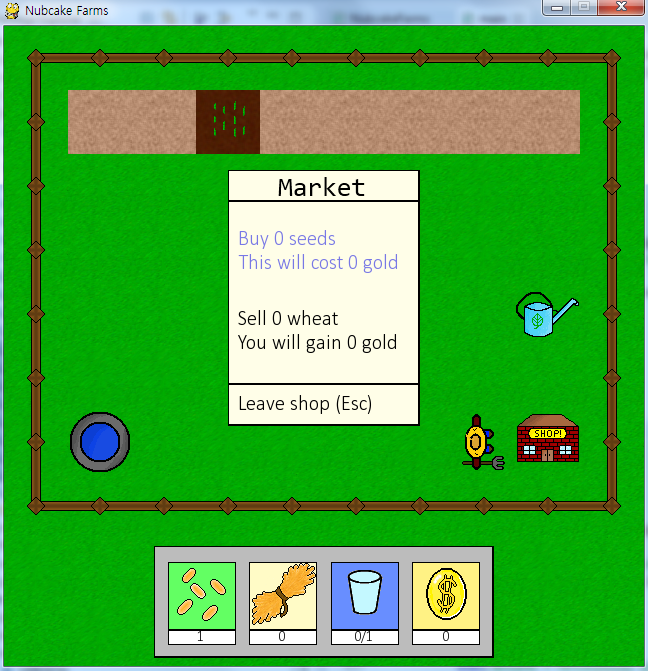
드디어 마지막이다. 마지막 강좌는 내용이 좀 길다. 상점 하나 추가하는데 별거 있겠어 하고 생각하면 오산이다. 상점 인터페이스를 만들고 메뉴를 만들고 메뉴 선택 시 반응을 정의하는 등의 처리를 해야한다.
1. Shop 클래스 추가
class Shop(pygame.sprite.Sprite):
def __init__(self, x, y):
pygame.sprite.Sprite.__init__(self)
self.image = load_img('scenery', 'shop.png')
self.rect = self.image.get_rect()
self.rect.topleft = x, y
self.active = False
self.selections = [["", # This first group is the seed purchase text
""],
["", # This second group is the wheat selling text
""],
""] # This last string is the leaving text
self.maxseeds = 0
self.selection = 0
def open(self):
self.update()
self.active = True
self.selection = 0
def close(self):
self.active = False
def update(self):
self.maxseeds = int(farmer.gold/2)
self.selections = [["Buy %d seeds" % (self.maxseeds),
"This will cost %d gold" % (self.maxseeds * 2)],
["Sell %d wheat" % (farmer.wheat),
"You will gain %d gold" % (farmer.wheat * 3)],
"Leave shop (Esc)"]
def up_selection(self):
self.selection -= 1
if self.selection < 0:
self.selection = 2
def down_selection(self):
self.selection += 1
if self.selection > 2:
self.selection = 0
def make_selection(self):
if self.selection == 0: # If the player wishes to buy seeds (all or none, for now)
farmer.gold -= self.maxseeds * 2
farmer.seeds += self.maxseeds
self.update()
elif self.selection == 1: # If the player wishes to sell wheat (all or none, for now)
farmer.gold += farmer.wheat * 3
farmer.wheat = 0
self.update()
elif self.selection == 2: # If the player wishes to leave the shop
self.close()
def __init__(self, x, y):
pygame.sprite.Sprite.__init__(self)
self.image = load_img('scenery', 'shop.png')
self.rect = self.image.get_rect()
self.rect.topleft = x, y
self.active = False
self.selections = [["", # This first group is the seed purchase text
""],
["", # This second group is the wheat selling text
""],
""] # This last string is the leaving text
self.maxseeds = 0
self.selection = 0
def open(self):
self.update()
self.active = True
self.selection = 0
def close(self):
self.active = False
def update(self):
self.maxseeds = int(farmer.gold/2)
self.selections = [["Buy %d seeds" % (self.maxseeds),
"This will cost %d gold" % (self.maxseeds * 2)],
["Sell %d wheat" % (farmer.wheat),
"You will gain %d gold" % (farmer.wheat * 3)],
"Leave shop (Esc)"]
def up_selection(self):
self.selection -= 1
if self.selection < 0:
self.selection = 2
def down_selection(self):
self.selection += 1
if self.selection > 2:
self.selection = 0
def make_selection(self):
if self.selection == 0: # If the player wishes to buy seeds (all or none, for now)
farmer.gold -= self.maxseeds * 2
farmer.seeds += self.maxseeds
self.update()
elif self.selection == 1: # If the player wishes to sell wheat (all or none, for now)
farmer.gold += farmer.wheat * 3
farmer.wheat = 0
self.update()
elif self.selection == 2: # If the player wishes to leave the shop
self.close()
2. Farmer 클래스의 interact() 함수 업데이트
elif entity.__class__.__name__ == 'Shop':
shop = entity
shop.open()
shop = entity
shop.open()
3. 상점 인터페이스 생성
# 상점 인터페이스를 생성한다
global shopinterface
shopinterface = pygame.Surface((192, 256))
shopinterface.convert()
shopinterfaceimage = load_img("hud", "shop.png")
shopinterface.blit(shopinterfaceimage, (0, 0))
global shopinterface
shopinterface = pygame.Surface((192, 256))
shopinterface.convert()
shopinterfaceimage = load_img("hud", "shop.png")
shopinterface.blit(shopinterfaceimage, (0, 0))
4. 맵데이터 로드 부분 수정
elif char == 'S':
global shop
shop = Shop(blockx, blocky)
objectlist.append(shop)
global shop
shop = Shop(blockx, blocky)
objectlist.append(shop)
5. 입력 체크 부분 수정
# 입력 체크
for event in pygame.event.get():
if event.type == QUIT:
return
elif event.type == KEYDOWN:
if event.key == K_ESCAPE:
if shop.active:
shop.close()
else:
return
elif event.key == K_UP:
if shop.active:
shop.up_selection()
else:
farmer.move("up")
elif event.key == K_DOWN:
if shop.active:
shop.down_selection()
else:
farmer.move("down")
elif event.key == K_LEFT:
if shop.active:
pass
else:
farmer.move("left")
elif event.key == K_RIGHT:
if shop.active:
pass
else:
farmer.move("right")
elif event.key == K_SPACE:
if shop.active:
shop.make_selection()
else:
farmer.interact()
elif event.key == K_TAB:
pass
for event in pygame.event.get():
if event.type == QUIT:
return
elif event.type == KEYDOWN:
if event.key == K_ESCAPE:
if shop.active:
shop.close()
else:
return
elif event.key == K_UP:
if shop.active:
shop.up_selection()
else:
farmer.move("up")
elif event.key == K_DOWN:
if shop.active:
shop.down_selection()
else:
farmer.move("down")
elif event.key == K_LEFT:
if shop.active:
pass
else:
farmer.move("left")
elif event.key == K_RIGHT:
if shop.active:
pass
else:
farmer.move("right")
elif event.key == K_SPACE:
if shop.active:
shop.make_selection()
else:
farmer.interact()
elif event.key == K_TAB:
pass
6. 상점 텍스트 업데이트 함수 정의
def update_shop_text():
font = pygame.font.SysFont('calibri', 20)
textpos_base = pygame.Rect((0, 0), (160, 20))
seed_text_color = (0,0,0)
wheat_text_color = (0,0,0)
leave_text_color = (0,0,0)
if shop.selection == 0:
seed_text_color = (120,120,230)
elif shop.selection == 1:
wheat_text_color = (120,120,230)
elif shop.selection == 2:
leave_text_color = (120,120,230)
spacer = 0
for line in shop.selections[0]:
buy_seeds_text = font.render(line, 1, seed_text_color)
buy_seeds_textpos = pygame.Rect((10, 60+spacer), (buy_seeds_text.get_width(), buy_seeds_text.get_height()))
shopinterface.blit(buy_seeds_text, buy_seeds_textpos)
spacer += 24
spacer = 0
for line in shop.selections[1]:
buy_wheat_text = font.render(line, 1, wheat_text_color)
buy_wheat_textpos = pygame.Rect((10, 140+spacer), (buy_wheat_text.get_width(), buy_wheat_text.get_height()))
shopinterface.blit(buy_wheat_text, buy_wheat_textpos)
spacer += 24
leave_text = font.render(shop.selections[2], 1, leave_text_color)
leave_textpos = pygame.Rect((10, 225), (leave_text.get_width(), leave_text.get_height()))
shopinterface.blit(leave_text, leave_textpos)
font = pygame.font.SysFont('calibri', 20)
textpos_base = pygame.Rect((0, 0), (160, 20))
seed_text_color = (0,0,0)
wheat_text_color = (0,0,0)
leave_text_color = (0,0,0)
if shop.selection == 0:
seed_text_color = (120,120,230)
elif shop.selection == 1:
wheat_text_color = (120,120,230)
elif shop.selection == 2:
leave_text_color = (120,120,230)
spacer = 0
for line in shop.selections[0]:
buy_seeds_text = font.render(line, 1, seed_text_color)
buy_seeds_textpos = pygame.Rect((10, 60+spacer), (buy_seeds_text.get_width(), buy_seeds_text.get_height()))
shopinterface.blit(buy_seeds_text, buy_seeds_textpos)
spacer += 24
spacer = 0
for line in shop.selections[1]:
buy_wheat_text = font.render(line, 1, wheat_text_color)
buy_wheat_textpos = pygame.Rect((10, 140+spacer), (buy_wheat_text.get_width(), buy_wheat_text.get_height()))
shopinterface.blit(buy_wheat_text, buy_wheat_textpos)
spacer += 24
leave_text = font.render(shop.selections[2], 1, leave_text_color)
leave_textpos = pygame.Rect((10, 225), (leave_text.get_width(), leave_text.get_height()))
shopinterface.blit(leave_text, leave_textpos)
7. 상점 여는 부분 작성
# 상점을 연다
if shop.active:
screen.blit(shopinterface, (224, 144))
shopinterface.blit(shopinterfaceimage, (0, 0))
update_shop_text()
pass
if shop.active:
screen.blit(shopinterface, (224, 144))
shopinterface.blit(shopinterfaceimage, (0, 0))
update_shop_text()
pass
