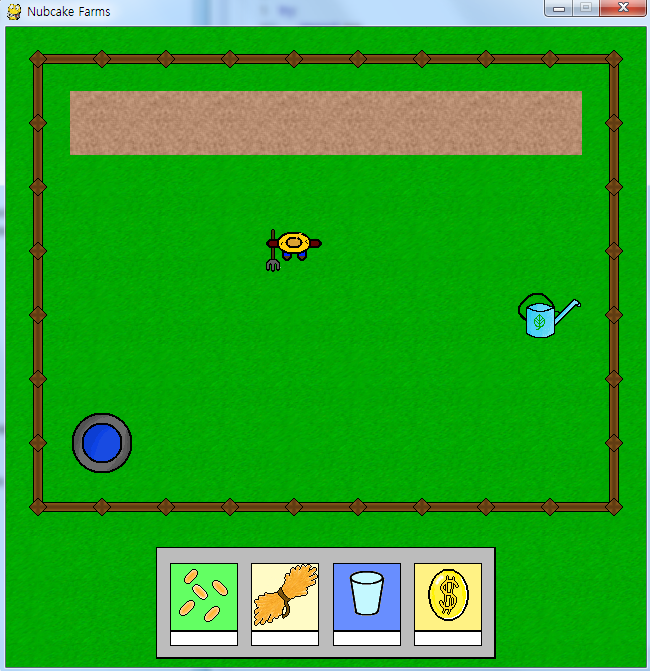
이제 농부가 농사를 짓기 위한 오브젝트를 추가해보자.
1. 땅 클래스
class Plot(pygame.sprite.Sprite):
def __init__(self, x, y):
pygame.sprite.Sprite.__init__(self)
self.dry_img = load_img('plot', 'plot_dry.png')
self.wet_img = load_img('plot', 'plot_wet.png')
self.image = self.dry_img
self.rect = self.image.get_rect()
self.rect.topleft = x, y
self.state = 'dry'
self.occupied = False
self.wettime = current_time - 15000
plots.append(self)
def dry(self):
self.state = 'dry'
self.image = self.dry_img
def wet(self):
self.state = 'wet'
self.image = self.wet_img
self.wettime = current_time
def update(self):
if current_time - 15000 >= self.wettime and self.state == 'wet' and not self.occupied:
self.dry()
def occupy(self):
self.occupied = True
def unoccupy(self):
self.occupied = False
def __init__(self, x, y):
pygame.sprite.Sprite.__init__(self)
self.dry_img = load_img('plot', 'plot_dry.png')
self.wet_img = load_img('plot', 'plot_wet.png')
self.image = self.dry_img
self.rect = self.image.get_rect()
self.rect.topleft = x, y
self.state = 'dry'
self.occupied = False
self.wettime = current_time - 15000
plots.append(self)
def dry(self):
self.state = 'dry'
self.image = self.dry_img
def wet(self):
self.state = 'wet'
self.image = self.wet_img
self.wettime = current_time
def update(self):
if current_time - 15000 >= self.wettime and self.state == 'wet' and not self.occupied:
self.dry()
def occupy(self):
self.occupied = True
def unoccupy(self):
self.occupied = False
땅은 두 가지의 상태를 가질 수 있다. 젖거나 마르거나이다. 씨앗을 심었을 때의 상태는 다른 클래스를 통해 제어할 것이다. 그리고 씨앗을 갖고 있는지 없는지는 occupied 변수를 통해 제어한다.
이 클래스에서 중요한 부분은 update() 함수이다. 땅을 적시면 그 시간이 wettime에 기록된다. 그리고 매번 시간을 체크하여 현재 시간 - 15000ms(15초) 값이 wettime보다 크고 씨앗이 없는 상태이면 땅을 마르게 된다. 즉 땅을 적신 후 씨앗을 심지 않고 15초가 지나면 땅이 마른다.
2. 우물, 물뿌리개 클래스
class Well(pygame.sprite.Sprite):
def __init__(self, x, y):
pygame.sprite.Sprite.__init__(self)
self.image = load_img('scenery', 'well.png')
self.rect = self.image.get_rect()
self.rect.topleft = x, y
class WateringCan(pygame.sprite.Sprite):
def __init__(self, x, y):
pygame.sprite.Sprite.__init__(self)
self.image = load_img('HUD', 'watering_can_large.png')
self.rect = self.image.get_rect()
self.rect.topleft = x, y
def __init__(self, x, y):
pygame.sprite.Sprite.__init__(self)
self.image = load_img('scenery', 'well.png')
self.rect = self.image.get_rect()
self.rect.topleft = x, y
class WateringCan(pygame.sprite.Sprite):
def __init__(self, x, y):
pygame.sprite.Sprite.__init__(self)
self.image = load_img('HUD', 'watering_can_large.png')
self.rect = self.image.get_rect()
self.rect.topleft = x, y
3번 강좌의 HUD 그리기 부분을 잘 이해했다면 특별히 어려운 것은 없다.
3. 맵 데이터 불러오는 부분 수정
elif char == 'L':
exec('plot%i = Plot(blockx, blocky)' % plotnum)
exec('objectlist.append(plot%i)' % plotnum)
plotnum += 1
elif char == 'W':
well = Well(blockx, blocky)
objectlist.append(well)
elif char == 'C':
wateringcan = WateringCan(blockx, blocky)
objectlist.append(wateringcan)
exec('plot%i = Plot(blockx, blocky)' % plotnum)
exec('objectlist.append(plot%i)' % plotnum)
plotnum += 1
elif char == 'W':
well = Well(blockx, blocky)
objectlist.append(well)
elif char == 'C':
wateringcan = WateringCan(blockx, blocky)
objectlist.append(wateringcan)
역시 어려운 것은 없다.
마지막으로 오브젝트를 화면에 출력하는 부분은 스스로 해보도록 하자. 물론 첨부 파일에 완성코드가 있다.
